

Making Of
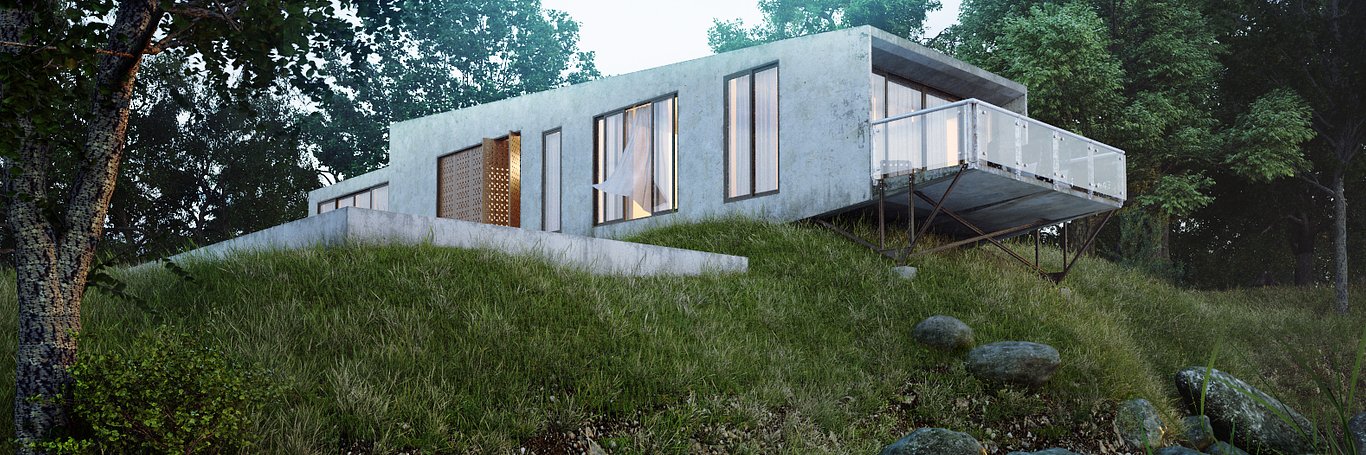
The Making of Siek Box House
Rio Febrian | 3D Artist | Denpasar, Indonesia
Hi all, thanks to the CGarchitect team for this great site and thank you for all who give comments, feedback and encouragement. In this article I will try to write the Making Of Siek Box House. This is my work for challenge the facebook group “3D Render Party”, and this box house is the 5th season of this group's challenges. The building model was provided by Arya Siek (the organizer/administrator of this group/challenge).


CONCEPT AND WORKFLOW
I believe that the preparation and planning step is very important in every visualization project. I was imagining which environment would be good for this box house. I had a simple picture in my mind about a silent river beside the house, with many stones on the river. I used Linear Workflow for gamma setting in my scene, and I turned the gamma to 2.2.

MODELING
As I mentioned before, this model was provided by the organizer of this challenge. But I remodeled this whole part of the house because I wanted to put some details with chamfered edges on every corner edge. I believe in reality most of the corner edges around us are chamfered, not sharp like a knife. I also made some details like screw heads on the railing.


TEXTURING
Most of the textures that needed dirt, like the concrete wall, the window frame, railing, back-wall panel, pool andconcrete, used the VrayBlendMaterial. I used VRayDirt for the 1st and 2nd blend amount. But you have to swap occluded color and unoccluded color in it. One of the V-Ray dirt is normal, and the other one is invert normal, to put the dirt on both directions of corner (inside and outside). The last blend amount is for the leaking part at the bottom of the wall, I used a leaking texture from www.cgtextures.com. Many of textures in this scene came from there. Here are my material setting for concrete wall:

I needed to put different map channels for the dirt, so here are my UV mapping for the wall:

I used the same method for the railings, pool concrete, window frame and back panels textures.
Here is the ground material where I applied the VrayDisplacement modifier:

LIGHTING AND GI
In this scene I only used VRay Sun for the lighting. To get this kind of dusk mood, I put the sun at a very low angle and I increased the size multiplier to get blurred shadows.
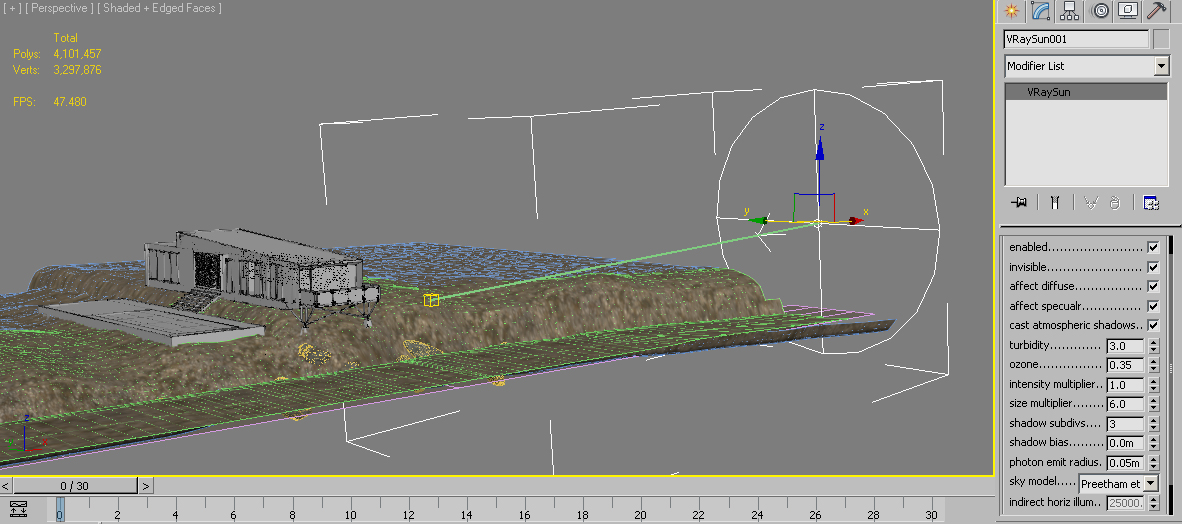
Next, we have to define the environment background and GI. I used two slots for the material, one of them for the background, and one for lighting (GI). Both were made the same, but just in case I needed to make some changes, I made them in separate slots. For the environment background and GI, I used a mix of material between VraySky and Bitmap. The bitmap is a 360° sky bitmap that I downloaded from www.cgtextures.com, I choose the dusk one. I did many tests for this to define the mix amount (which one is better, close to the VraySky or close to the bitmap sky). In the bitmap, I also brought the RGB levels up to get the right level. Here is the mix:


GRASS, PLANTS AND SCATTERING
I used models from iTree and Evermotion for the trees in this scene and of course I proxied them. For the grass I used models from iGrass, and then I scattered them using multiscatter and multipainter. I also painted some gravel on the ground. Here you can see the scatters I used:

Main grass:

Field big-grass:

Galium plants:

Gravel (I used the asteroid generator script to create many different shapes of stones):

RENDERING
I rendered this scene with V-Ray, my favorite render engine. Here are the render settings:

THE POST-PRODUCTION
In this post-production step, I used Photoshop and MagicBullet PhotoLooks. Actually this is not a heavy post production. I only did color corrections, added contrast, glow and fixed the saturation on grass. Here are the layer/steps:
Original render

Darker water and stones

Color correction and add contrast

Color correction and sharpening

More sharpening on the gravel and stones area

Reduce grass saturation

More contrast and sharpening on the left/foreground tree

Adding sky glow

Adding a little bit fog using Z-depth

Add darker part at the bottom of the stones:
As you can see, the post production for this scene is not complicated, it is only about adding contrast, color correction, and adding fog and glow. But the most important thing is to think creatively when we compose the image.
Here are the wireframes for every single view that I posted before:


Well, I hope you enjoyed this article, and may it help you in some way. Please feel free to ask if there are any questions.
You must be logged in to post a comment. Login here.

Ovie Asah
Report Abuse
Great work! Thanks for sharing.
Ovie Asah
Report Abuse
Great work! Thanks for sharing.

Afolabi Olalekan
Report Abuse
Wow, fantastic render. Extremely detailed and also ultra realistic.
Very Lovely work

James Reben
Report Abuse
Interested what your Adaptive DMC sampler rollout looked like...
Did you link the clr thresh with DMC sampler thresh?
James Reben
Report Abuse
Great set of images and nice write-up, as well.
Especially enjoy views 1, 2, and 3.
Materials and lighting are looking very realistic, nice work.
I like the technique you used for the BG and environment.
Thanks for sharing...
e
efren francis
Report Abuse
superb! may i know your vray camera setting?
thanks.

Dhavid Ben Trinidad
Report Abuse
mantap sir congratulations!
shaon onu
Report Abuse
Nice work ,great..
J
JohnHamilton Abadiez
Report Abuse
great work master..you inspire me ti learn more om cg..thanks master..

arezoo mirshekar
Report Abuse
great

Rio Febrian
Report Abuse
Thanks Lucky, Michael, Yojan and Lucky.
The answer for Michael's questions:
You need to use the vray edgetex material, its let you choose the colour of the lines and the solid elements too, you can make the solids transparent if you don't want hidden line style. And then drag that material slot into the override material button in the render setting.
L
Luca Ottaviani
Report Abuse
Your work, it's absolutely... "real". I was astonished!
best regards from Italy

yojan yluismm
Report Abuse
Thanks my friend!!
Michael Fountouklis
Report Abuse
Amazing work, really incredible!
I am looking at this work almost everytime i need to get inspired!
One question, the wireframe shots you have at the end,
how did you created those?
Is it a shaded model with edges on? And then rendered? Or just print screen? Or is it another way/program?
Thanks a lot!
Keep it up!

Lucky Bisasu
Report Abuse
Great Job
thanks for sharing...
Sukses terus
Rio Febrian
Report Abuse
It was about 1,5 hours on 1600 px resolution bro.
Rio Febrian
Report Abuse
The water I just give noise on bump, you have to adjust the size of that noise. And for this river water I give a bit dark-brown for fog color.
The render elements will automatically extracted to be individual layers in photoshop if you check "Save separate render channels" on V-Ray Frame buffer tab.
I
ILIA IRANI
Report Abuse
Great tutorials. very informative. THANX

Mojtaba Yaghoobi
Report Abuse
How Much rendering Time ??
h
hana saba
Report Abuse
MY EMAIL ADD IS gnsn_gnsn@hotmail.com
About this article
Indonesia's Rio Febrian provides an exclusive detailed breakdown of his Siek Box House scene.
visibility80.2 k
favorite_border99
mode_comment98